SOMA Inspired Terminal Display with CSS
2021-05-29
A few years back I played (and loved) SOMA, a first-person sci-fi horror-adventure game. The story was intriguing and the developers nailed the overall atmosphere of Pathos-II. Though both those aspects were great, what I found the most enjoyable were the interactive computers and displays found sprinkled throughout the world.
Three years ago I wanted to see if I could recreate one of those terminal displays with HTML & CSS. And I did just that.
So, why am I writing about this three years later? Well, I never did a proper write-up explaining how I achieved it. I’m sure someone out there in the wild west of the web could get some value out of this tutorial, right? I hope so!
The Live Demo
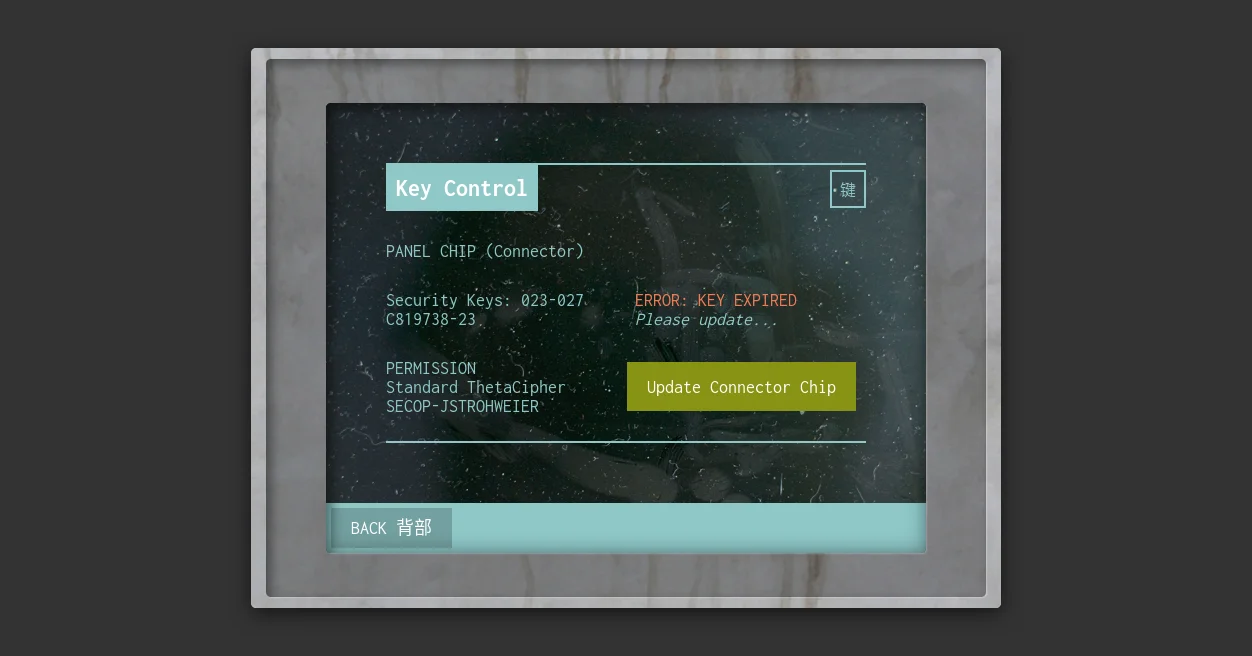
The HTML
Nothing fancy going on here - just some simple div elements holding a few paragraphs and spans:
<div class="outer-frame">
    <div class="screen">
        <div class="screen-guts">
            <h2>Key Control</h2>
            <p><span>Panel Chip</span> (Connector)</p>
            <p class="column">
                Security Keys: 023-027<br>C819738-23
                <br>
                <span class="error">Error: Key Expired</span>
                <br>
                <em>Please update...</em>
            </p>
            <p>
                <span>Permission</span>
                <br>
                Standard ThetaCipher
                <br>
                <span>Secop-Jstrohweier</span>
            </p>
            <button class="update-button">Update Chip</button>
        </div>
        <div class="bottom-controls">
            <button class="back-button">Back 背部</button>
        </div>
    </div>
</div>
The CSS
Let’s just dump all the CSS right here (don’t worry, it looks far more complicated than it really is):
@import url('https://opentype.netlify.com/sansation/index.css');

* {
    box-sizing: border-box;
}

body {
    background: #333;
    font-family: "Sansation", sans-serif;
    padding: 3rem 0;
}

button {
    appearance: none;
    border: 0;
    cursor: pointer;
    font-family: "Inconsolata", "Consolas", mono;
    font-size: 18px;
    transition: 0.3s ease all;
}

.outer-frame,
.screen {
    display: block;
    margin: 0 auto;
    position: relative;
}

.outer-frame {
    background: #ccc url("https://preview.ibb.co/iS9nz7/screen_grunge.webp") no-repeat center;
    background-size: cover;
    border-radius: 5px;
    box-shadow: 0 5px 20px rgba(0,0,0,0.6);
    height: 560px;
    width: 750px;
}
.outer-frame:before {
    background: rgba(0,0,0,0.3);
    border-radius: 5px;
    box-shadow: inset 5px 5px 10px rgba(0,0,0,0.4), 1px 1px 1px rgba(255,255,255,0.3);
    content: '';
    height: 538px;
    left: 15px;
    position: absolute;
    top: 11px;
    width: 720px;
}

.screen {
    background: #000 url("https://image.ibb.co/gOqSz7/screen_dust.webp") no-repeat center;
    background-size: cover;
    border-radius: 5px;
    height: 450px;
    left: 75px;
    padding: 60px;
    position: absolute;
    top: 55px;
    width: 600px;
}
.screen:after {
    background: url("https://s13.postimg.org/85ryuy1o7/dust.webp") no-repeat center;
    background-size: cover;
    border-radius: 5px;
    box-shadow: inset 0 0 20px rgba(0,0,0,0.5), inset 5px 5px 10px rgba(0,0,0,0.4), 1px 1px 1px rgba(255,255,255,0.3);
    content: '';
    height: 100%;
    left: 0;
    opacity: 0.8;
    pointer-events: none;
    position: absolute;
    top: 0;
    width: 100%;
    z-index: 2;
}

.screen-guts {
    border-bottom: 2px solid #8fc8c8;
    border-top: 2px solid #8fc8c8;
    height: calc(100% - 50px);
    position: relative;
    width: 100%;
    z-index: 0;
}
.screen-guts:after {
    border: 2px solid #8fc8c8;
    color: #8fc8c8;
    content: '键';
    padding: 5px 8px;
    position: absolute;
    right: 0;
    top: 5px;
}
.screen-guts h2 {
    background: #8fc8c8;
    color: #fff;
    display: inline-block;
    font-size: 24px;
    margin: 0 0 30px 0;
    padding: 10px;
}
.screen-guts p {
    color: #8fc8c8;
    font-size: 18px;
    margin: 0 0 30px 0;
}
.screen-guts p.column {
    column-width: 200px;
}
.screen-guts p span {
    text-transform: uppercase;
}
.screen-guts p span.error {
    color: #f37c56;
}
.screen-guts p span em {
    text-transform: none;
}
.screen-guts button.update-button {
    background: #889314;
    bottom: 10px;
    color: #fff;
    padding: 15px 20px;
    position: absolute;
    right: 0;
}
.screen-guts button.update-button:hover {
    background: #515905;
}

.bottom-controls {
    background: #8fc8c8;
    border-radius: 0 0 5px 5px;
    bottom: 0;
    display: flex;
    left: 0;
    height: 50px;
    padding: 5px;
    position: absolute;
    width: 100%;
}
.bottom-controls button.back-button {
    background: rgba(0,0,0,0.2);
    color: #fff;
    line-height: 20px;
    padding: 8px 20px;
    text-transform: uppercase;
}
.bottom-controls button.back-button:hover {
    background: rgba(0,0,0,0.6);
}
The overall styling is fairly simple (which is great for browser support) with only a couple pseudo elements. It’s important to include the custom Sansation typeface, since this is what the game uses for most UI elements and terminals. (I’m loading in this font via my OpenType side project)
The most important properties that truly bring this design together are those associated with the .outer-frame and .screen pseudo elements. Both of these elements use custom background-images that give a little more depth and life to the terminal - in this case fingerprints, dust and smudges.
Feel free to swap these image textures out with your own and alter the terminal as you see fit!